



Super F405HD ELRS 3-in-1 AIO Flight Controller – Built-in UART 2.4G ELRS & 20A ESC for HD Whoops (25.5×25.5mm)
Super F405HD ELRS 3-in-1 AIO Flight Controller – 25.5×25.5mm
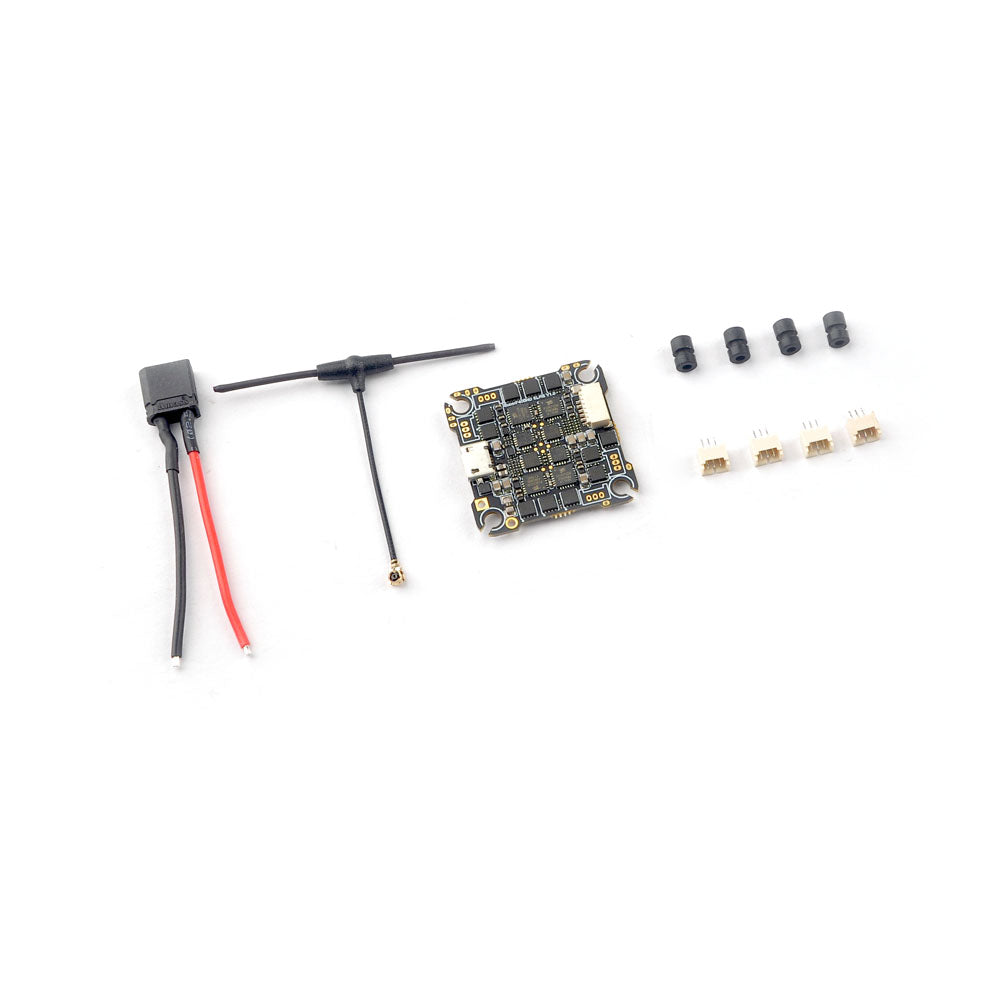
The Super F405HD ELRS AIO is a high-performance flight controller for 3-4S HD digital FPV Whoops. It integrates a 20A Blheli_S 4-in-1 ESC, UART 2.4GHz ExpressLRS receiver, BMP280 barometer, blackbox storage, and voltage/current meters, offering a compact and powerful solution for HD FPV builds.
Key Features:
- All-in-one 3-in-1 design: Flight Controller + 20A 4-in-1 ESC + UART 2.4GHz ExpressLRS receiver
- MCU: STM32F405RGT6 (168MHz, 1MB FLASH)
- Gyro Sensor: ICM42688 (SPI connection)
- Mount hole size: 25×25mm
- Power supply: 3-4S LiPo (11–17.4V)
- Built-in BMP280 barometer for altitude stability
- Onboard 8MB Blackbox for flight data logging
- Voltage and current sensors: voltage scale 110, current scale 470
- ESC: 20A continuous, 25A peak (5s), BLHeliSuite programmable, DSHOT150/300/600 supported
- ExpressLRS Receiver: 2.4GHz CRSF protocol, packet rates 25–500Hz, default firmware V3.0.1
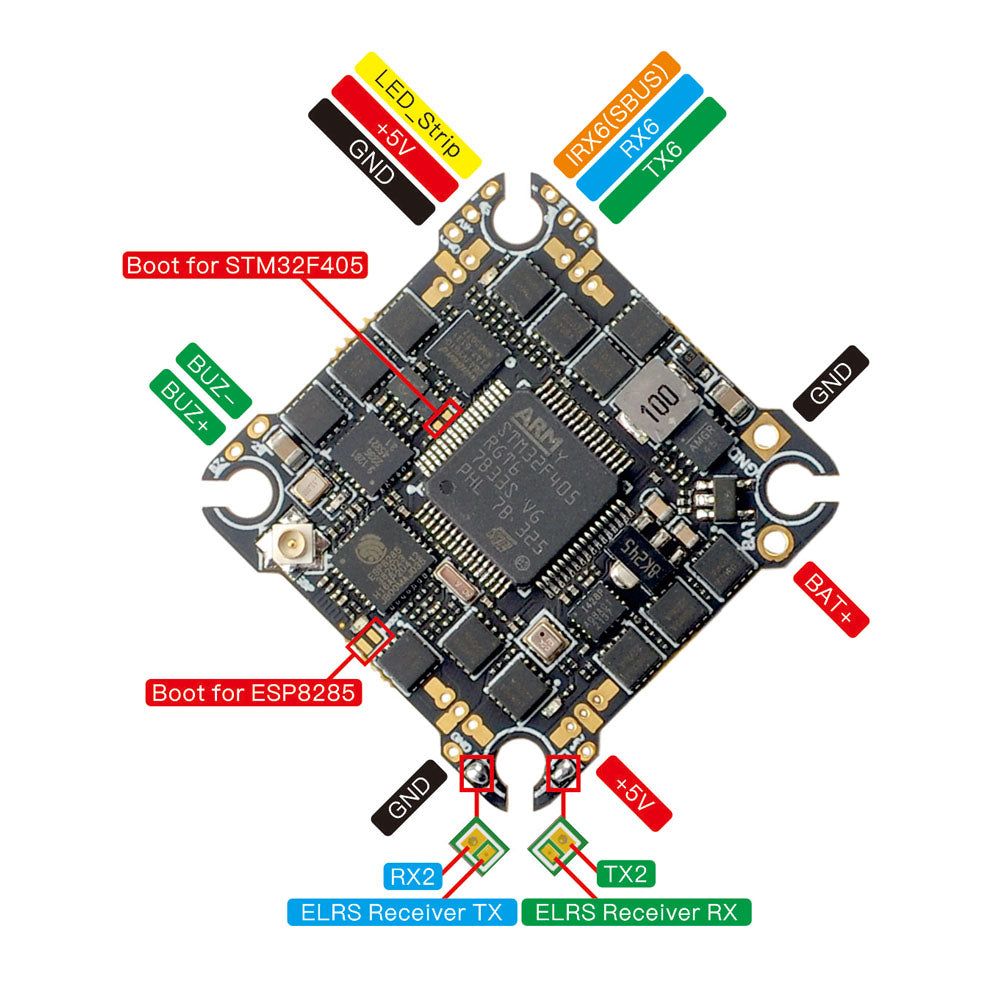
- Reserved 6-pin socket for DJI HD equipment plug-and-play
- UART assignments: UART1 for MSP/OSD, UART2 default for ELRS, UART6 optional for GPS or other serial devices
Binding Instructions:
- Power the FC via USB, wait for the red LED to turn off, power cycle twice. On the third power-up, red LED double-flash indicates binding mode.
- Use ExpressLRS.lua in your transmitter to bind. Red LED solid = bind successful; double-flash = bind mode; slow flash = no RC signal; fast continuous flash = ExpressLRS WiFi enabled; tri-flash = model mismatch.
Notes:
- For barometer functionality with Betaflight 4.4.x, add custom defines “BARO_DPS310 ACC_SPI_ICM42688P GYRO_SPI_ICM42688P” before flashing firmware online.
NOTES:If you want to use Barometer and want to upgrade firmware to betaflight 4.4.x ,you need to add custom Defines “BARO_DPS310 ACC_SPI_ICM42688P GYRO_SPI_ICM42688P” from build configuration of betaflight configurator before load online firmware otherwise gyro will not working .  Enabled Barometer steps:After re-flashed firmware successfully , please connect to betaflight configurator and go to CLI command ,then type the following command:
resource I2C_SCL 2 B10
resource I2C_SDA 2 B11
set baro_bustype = I2C
set baro_i2c_device = 2
save
Default port settings: If you want to use DJI Radio Controller , please change to the following settings:


Super F405HD ELRS 3-in-1 AIO Flight Controller – Built-in UART 2.4G ELRS & 20A ESC for HD Whoops (25.5×25.5mm)
Description
Super F405HD ELRS 3-in-1 AIO Flight Controller – 25.5×25.5mm
The Super F405HD ELRS AIO is a high-performance flight controller for 3-4S HD digital FPV Whoops. It integrates a 20A Blheli_S 4-in-1 ESC, UART 2.4GHz ExpressLRS receiver, BMP280 barometer, blackbox storage, and voltage/current meters, offering a compact and powerful solution for HD FPV builds.
Key Features:
- All-in-one 3-in-1 design: Flight Controller + 20A 4-in-1 ESC + UART 2.4GHz ExpressLRS receiver
- MCU: STM32F405RGT6 (168MHz, 1MB FLASH)
- Gyro Sensor: ICM42688 (SPI connection)
- Mount hole size: 25×25mm
- Power supply: 3-4S LiPo (11–17.4V)
- Built-in BMP280 barometer for altitude stability
- Onboard 8MB Blackbox for flight data logging
- Voltage and current sensors: voltage scale 110, current scale 470
- ESC: 20A continuous, 25A peak (5s), BLHeliSuite programmable, DSHOT150/300/600 supported
- ExpressLRS Receiver: 2.4GHz CRSF protocol, packet rates 25–500Hz, default firmware V3.0.1
- Reserved 6-pin socket for DJI HD equipment plug-and-play
- UART assignments: UART1 for MSP/OSD, UART2 default for ELRS, UART6 optional for GPS or other serial devices
Binding Instructions:
- Power the FC via USB, wait for the red LED to turn off, power cycle twice. On the third power-up, red LED double-flash indicates binding mode.
- Use ExpressLRS.lua in your transmitter to bind. Red LED solid = bind successful; double-flash = bind mode; slow flash = no RC signal; fast continuous flash = ExpressLRS WiFi enabled; tri-flash = model mismatch.
Notes:
- For barometer functionality with Betaflight 4.4.x, add custom defines “BARO_DPS310 ACC_SPI_ICM42688P GYRO_SPI_ICM42688P” before flashing firmware online.
NOTES:If you want to use Barometer and want to upgrade firmware to betaflight 4.4.x ,you need to add custom Defines “BARO_DPS310 ACC_SPI_ICM42688P GYRO_SPI_ICM42688P” from build configuration of betaflight configurator before load online firmware otherwise gyro will not working . Enabled Barometer steps:After re-flashed firmware successfully , please connect to betaflight configurator and go to CLI command ,then type the following command:
resource I2C_SCL 2 B10
resource I2C_SDA 2 B11
set baro_bustype = I2C
set baro_i2c_device = 2
save
Default port settings:If you want to use DJI Radio Controller , please change to the following settings: